As a flight training tool
The concept of using simulation as a training aid is simple. Learn everything you possibly can on the ground, so that your hard-earned flight time can be used perfecting stick and rudder skills and maneuvers, rather than systems and procedures.
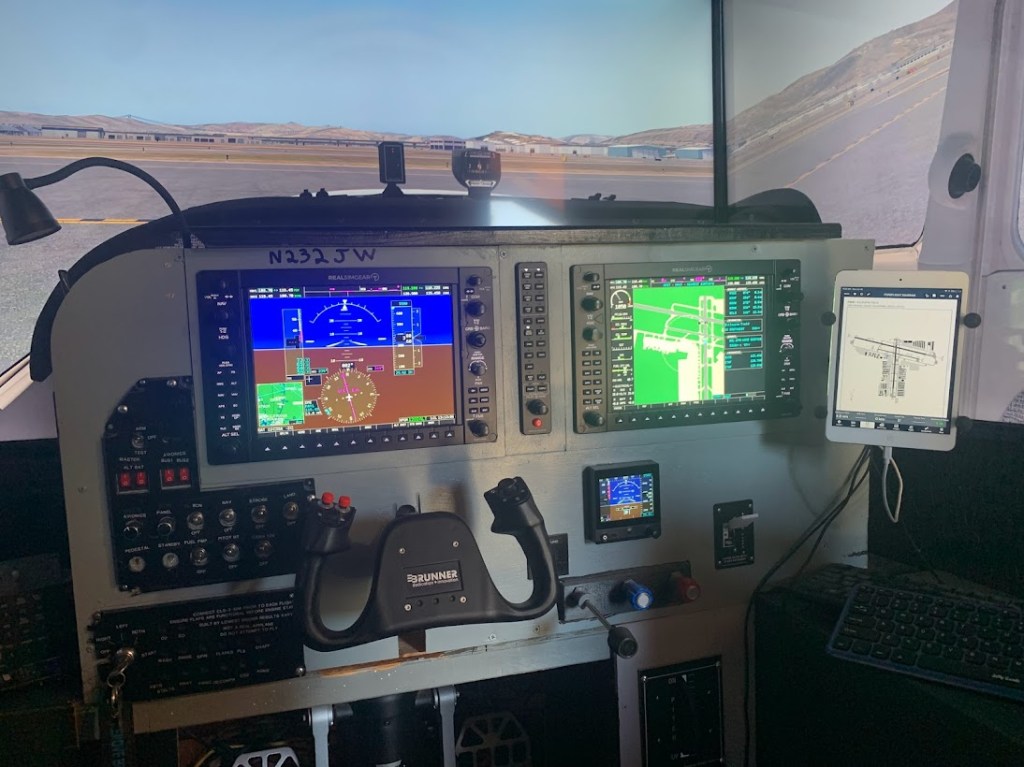
The following system was developed to maximize student engagement and learning.
A.G.A.S.T.
The Advanced General Aviation Systems Trainer
The Advanced General Aviation Systems Trainer (AGAST) is designed to provide a high-fidelity simulation of the G1000 equipped Cessna 172SP that will be used for cadet flight training. The system features 240 degrees of view on three 55” monitors running at 1080P, an enclosure with adjustable seat, and a full set of flight controls to include yoke, throttle and mounted rudder pedals (See pictures at the end of the document). The scenery is from OrbX and features photoreal landscape that facilitates pilotage and dead reckoning navigation. The G1000 system and other controls are replicated in hardware on a close to (over 95%) switch by switch basis, with the exception of the parking break handle. No use of keyboard or mouse is required to fly the simulator. The yoke is a ‘force feedback’ system, described by some as ‘robotic’, that simulates accurate control pressures, vibration and adjusts to various speed regimes. Controls are stiff at cruise and ‘mushy’ in slow flight, emulating the real airplane.
Air traffic control services are provided by real controllers online. Professional human controllers enforce airspace rules and insist on correct radio procedures. A fully developed “Communication and Airspace Training” (CAT) program, with pass or fail exams graded by the controllers, provides a framework for teaching the student airspace, radio communications and cross-country navigation. Weather can be adjusted to provide additional challenges. (See http://www.pilotedge.net )
The simulator integrates with a tablet based EFB solution, such as ForeFlight, should the student choose to use it.
The simulator training program takes a minimum of 50 simulated flight hours to complete and can be led by a flight or ground instructor. The use of ground instructors and self-practice will conserve flight instructor resources, increasing the capacity of the program.
Phase one of the program begins with an orientation phase consisting of eight hours of simulated flight to develop basic flight techniques and system procedures familiarity. The students will make their first radio calls in this phase.
After Phase one, Phase two consists of the eleven PilotEdge “Communications and Airspace Training” (CAT) flights. The student will review all material for each flight prior to showing up for the flight, including instructional videos and written materials, charts and chart supplements, etc. Weather will be checked, TOLD completed and a weight/balance done for each flight. Checklists will be used from startup to shut down. As you will see, the airspace gets significantly more challenging as the program progresses, with class Bravo airport arrivals, departures and Bravo airspace transitions in the final flights.
Phase three replicate the cross-country flight training in the private pilot syllabus. They will include all flight planning tasks, and execution of the flight with full PilotEdge ATC. The instructor can assign the long cross-country destinations. These flights will be conducted using flight planning procedures and, weather permitting, real weather. This stresses aeronautical decision making and risk management. Student pilots typically conduct three cross-country solo flights. These flights can be conducted in the simulator first, ensuring familiarity with airspace and procedures. Additional cross country flights can be conducted to additional destinations, reinforcing these skills and resulting in a student that is more confident and ready to expand their horizons. The student can fly to and from nearly all airports in the western U.S., further reinforcing navigation and communication skills and familiarizing them with their home airspace at NO cost.
Phase four includes emergency procedures, lost procedures, VFR Flight into IMC procedures (flight with reference to instruments). These are skills that can be repeated until the student pilot reacts instinctively, at no cost to the student. This maximizes safety and minimizes cost.
Ideally, the student will complete phase one, and up to the CAT-4 exam in phase two before starting primary flight training in a CAP aircraft.
From phase two, all of the areas below will be stressed:
- Checklists and procedures (From pre-flight to shutdown)
- Avionics use (G1000 and Autopilot)
- ATC Communications
- Airspace rules
- Pilotage and Dead Reckoning
- Radio and GPS navigation
- Use of EFB in flight
- Single Pilot Resource Management
- Risk Management
- Aeronautical decision making
Training schedule
Phase 1 – 8 hours
- Simulator and curriculum orientation – 1 hour
- “Dollar Ride” – Orientation flight – 1 hour
- Straight and level flight, trim, turns, climbs and descents – 1 Hour
- Develop performance profile for aircraft – 1 hour
- Engine start, Runup, Taxi and takeoffs – 1 hour
- Traffic patterns – 1 hour
- Landings 1 – 1 hour
- Landings 2 – 1 hour
- More landings as required
*** Note that ‘stick and rudder’ skills are intended to be taught in the airplane, not the simulator. Phase one is intended to teach basic procedures and get the student flying the sim around the San Diego area in a reasonably competent manner, so that the student can move on to phase 2.
Phase 2 – 26 hours (PilotEdge CAT rating program)
(All flights practiced at least once, then flown in the form of an exam graded by controllers) (CTRL=Click to view the links)
- CAT-01: Non-Towered to Non-Towered services (L52-L88)– 2 hours
Short flight between 2 non-towered airports without any air traffic control CAT-02: Non-Towered to Class D (L88 to SBP) – 2 hours
Non-towered to a Class D airport without flight following (L88-KSBP) - CAT-03: Pattern Work, 3 laps – 2 hours
Introduction to pattern work at San Luis Obispo (KSBP) - CAT-04: Class D to Class D – 2.5 hours
Fly between two Class D airports without flight following (KSBP-KSMX) - CAT-05: Class D to Class D with Flight Following 2.5 hours
Fly between two Class D airports and obtain VFR Traffic Advisories while en-route (KSMX-KBFL) - CAT-06: Class D to Class D with Flight Following from the Ground 2.5 hours
Fly between two Class D airports and obtain VFR Traffic Advisories prior to departure (KBFL-KMHV) - CAT-07: Class C Transition 2.5 hours
Fly between two Class D airports, transition Class C airspace while enroute (KSBD-KEMT) - CAT-08: Class C Departure & Arrival 2.5 hours
Fly between two Class C airports (KSBA-KBUR) - CAT-09: Class B Flyways 2.5 hours
Fly from a Class C airport to a Class D airport, utilizing Flyways under the Los Angeles Class B Airspace (KBUR-KFUL) - CAT-10: Class B Published Transitions 2.5 hours
Use a published Bravo transition to fly from Camarillo Airport (KCMA) to John Wayne Airport (KSNA) - CAT-11: Class B Departure & Arrival 2.5 hours
Fly between two Bravo airports (KLAX-KSAN)
*** These flights are to be flown with instructor coaching the first time, then on their own for the exam. The controllers award the rating at the end of a satisfactory flight.
Phase 3 – 14 hours Assuming training is conducted from Gillespie field. This gets the cadet/student familiar with local airfields.
- Local flight from KSEE-KRNM, KSEE-KSDM – 2 hours
- Local flight from KSEE-KMYF, KSEE-KCRQ – 2 hours
- Local flight from KSEE-KOKB, KSEE-F70 – 2 hours
- Flight to KHMT and back – 2 hours (First cross country)
- Second cross country (Assigned by instructor) – 4 hours
- Night cross country to KSNA – 2 hours
Phase 4 – 5 hours
- Lost procedures – 1 hour
- Emergency procedures – 2 hours
- Flight with reference to flight instruments/VFR flight into IMC – 2 hours
A student that masters these lessons in the CAP AGAST simulator will have a tremendous advantage in flight training and should be able to complete the Private Pilot certificate in as little as 40 hours.
All “Laws of learning” in the FAA Aviation Instructors Handbook will be engaged.
Primacy – Teaching procedures and professionalism from the beginning at a young age (Cadets will begin this program at age 15, or slightly sooner depending on the pipeline wait list)
Exercise – The minimum program includes no fewer than twenty flights to airports in southern California, and operations at over 30 airports. This would not be practical in conventional flight training. Being that using the sim costs nothing, a student can fly any combination of scenarios. More challenging scenarios can be prescribed by the instructor with factors such as weather, terrain and weight/balance conditions. This makes the simulator an “Aeronautical Decision Making Gym”tm.
Effect – Learning in a safe, pleasant, and positive environment allows for the engagement of high order/critical thinking skills, risk management, and aeronautical decision making skills.
Readiness – In flight training, certain needs must be fulfilled (Physiological and Safety/Security) before learning can occur. In fact, the higher up the pyramid of needs the student is, the more insights they will receive and retain. Becoming familiar and comfortable with the cockpit environment on the ground provides a solid foundation for flight training in the real aircraft. This simulator and training program can fulfil Belonging, Esteem and Cognitive-Aesthetic needs to a degree, readying the student for real world flight training.
Intensity – Integration of all systems, from the G1000, Electronic Flight Bag and Human Air Traffic Controllers provide an intense, vivid experience. Photo-realistic scenery with 240-degree field of view, hardware cockpit controls, and an ultra-realistic flight model contribute to the ‘Suspension of disbelief’ in the student, immersing them in the aviation environment. The cadet will also learn to cope with ‘Task Saturation’ that can degrade performance. Controllers can issue unexpected clearances and the instructor can fail systems to challenge the students.
Recency – During flight training, the student can repeat certain lessons, or be assigned to watch videos and fly a certain task just prior to a flight lesson. (Also enhancing Readiness) This places the flight lesson material in short term memory, enhancing learning in flight. It also teaches students to come prepared.
*Note that the time spent in simulated flight may not be logged as flight time, as the simulator is not a BATD at this point.
The simulator is engaging and fun for students. It builds confidence in the students’ knowledge and skills before they begin incurring the expense of flying the training aircraft. Successful completion to the CAT-4 exam level can act as a gatekeeper for flight training.
The simulator training program is intended be taught and run by a ground instructor who preferably holds a private pilot certificate or better. A cadet who is a graduate of the program, is a solo pilot and gets a recommendation from CAP instructor would be qualified as well. Once complete, the student can continue learning on their own in the sim, on the basis of availability.
Upon completion of flight training, the student can then use the PilotEdge instrument training programs to learn to fly in the IFR system. While there are no plans to train cadets to this level, it will set them up for success in their aviation career, and increase their knowledge of the aviation environment. This program is 11 videos and IFR flights covering everything from approaches, SIDs/STARs, DME Arcs, etc.
There are also some ‘challenge scenarios’ that assign the student to a charter company flying under Part 135. Thie simulator can be configured in software to be a Cessna 206 for this use case.
Civil Air Patrol mission scenarios can be developed preparing student for an Emergency Services Mission Pilot role when the convert to a senior member (At age 18 or later).
PilotEdge is a subscription-based service that costs $20 per month per student for the southern California area. The student will need to maintain the subscription until the program is complete.
Navigation databases are updated by subscription, and will be handled at the squadron level.
A student with a reasonably current PC or Macintosh computer can make a modest investment in a flight control setup and can practice at home as well. This would require Flight simulation software, a Joystick or yoke (preferred) and a gaming or bluetooth headset for talking to ATC. Depending on how much hardware the student currently has, the investment could be as little as $100. X-Plane can be downloaded and used in Demo mode to see how it runs well on the students PC.
Advantages of using AGAST or similar simulators in CAP Cadet Flight Training or primary civilian flight training.
Significant cost savings: Skills learned in an hour of simulator time can save a corresponding number of hours in the air. With flight costs approaching $120 per hour for cadets, a reduction of 20 hours in time to complete flight training equates to a $2400 reduction in flight training costs. According to the FAA, the average student takes between 60-75 hours to complete training. It is more in area with complex airspace such as Los Angeles, San Diego and San Francisco.
Higher quality of training experience: When using this system, a student that achieves their Private pilot certificate in fifty logged hours will have spent a minimum of 100 hours training and practicing hands on. Due to the expanded cross country and navigation training in the program, the system provides three times the scenario based training experience compared to conventional flight training, with the Cadet gaining insight and reinforcing Aeronautical Decision Making skills. The end result is a more professional, knowledgeable, competent, and confident pilot. If the Cadet avails themselves of the Instrument and charter program, knowledge and ADM skills will be further enhanced.
Conserves flight instructor time: As this is not logged flight time, a flight instructor is not required. A ground instructor can teach the program. Many of the flights (The CAT exams, for example) do not require an instructor at all.
Maximizes student engagement and exposure to aviation: It is said that it requires 2-3 flights a week to train efficiently. If one or more flights a week are in a simulator learning skills that are appropriately taught in a sim, one or two flights a week can be spent mastering stick and rudder skills in the training aircraft. This greatly compresses the training timespan. A student that flies with an instructor twice a week can actually ‘Fly’ four flights a week if they fly two sorties in the sim. This engages the law of exercise. Skills like ADM, Risk Management and Communications become second nature early in training.
Helps determine if a cadet is an appropriate flight training candidate before expending resources: The CAP AGAST program can be used to vet and evaluate cadets. While they learn about aviation.
Sets cadets and civilian students up for success!
Current Status
The simulator is ALMOST fully functional, but perfectly usable for the purposes of this program. The fuel selector pedestal must be installed, Go-Around button connected, Alt Air and parking brake switches installed. A new acrylic panel is being designed to replace the prototype wood panel. This will include all plackards found in the real aircraft. Force feedback rudder pedals are in future plans. The enclosure is not complete, as it needs sides, carpet, Instructor station pedestal (the sim is controlled from an Ipad), etc. Finish wiring is necessary as well, and will be done when the sim is moved to its final station.

Cowles mountain is detailed enough that you can see the hiking trails. This level of fidelity allows VFR navigation by terrain and landmark.
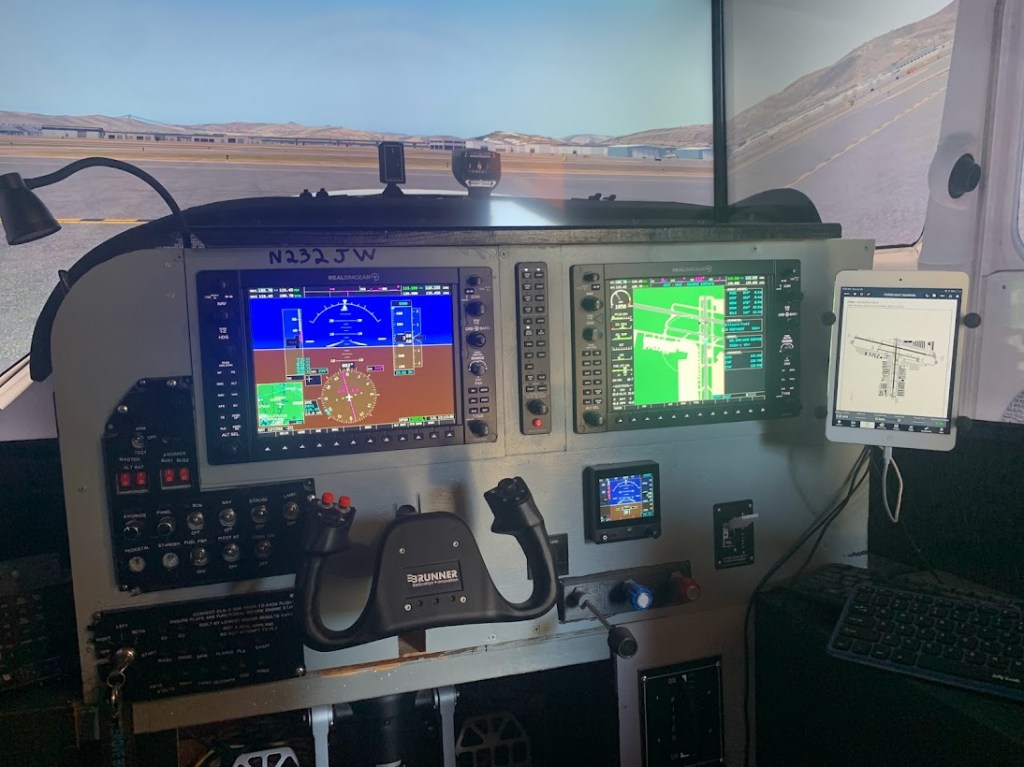
The yoke is ‘force feedback giving a more realistic feel. The G1000 database is current and maintained for online use. The switch panels and ignition/breaker panels are prototypes. New panels are awaiting the acrylic laser cut panel base that will replace the current plywood panel. Shown below.
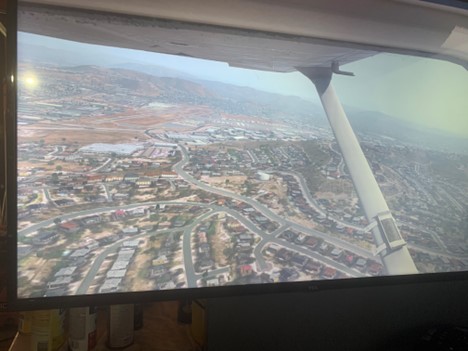
After turning crosswind following takeoff.

The tablet is GPS integrated to simulate actual flight conditions. (shown with legacy touch screen implementation)
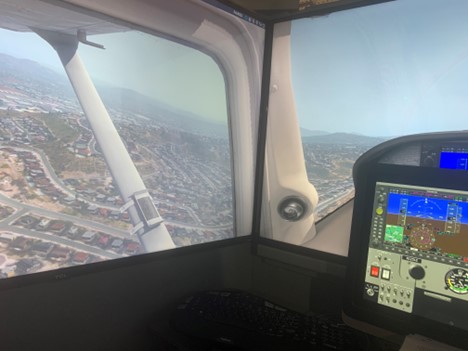
Side screens are offset 80 degrees to give a side view. (Shown with legacy touch screen implementation)
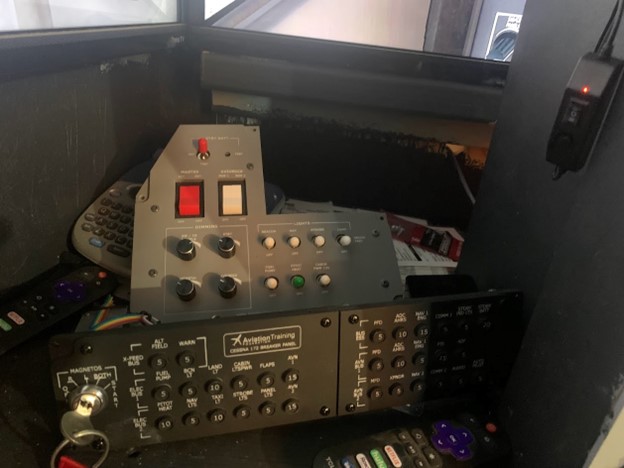
New, “almost authentic” switch and breaker panels will be installed shortly.

A.G.A.S.T. is under constant development. The focus is on open source hardware that can be built by an individual at a fraction of the commercial cost. The G1000 displays and radio panel above sell for $2300 commercially. A laser cut and 3D printed version can be built at a cost of under $500, with roughly $450 in tools (Resin printer and 40W Co2 laser cutter). That’s half the cost of commercial panels.
See the following website for G1000 panel construction:
https://fouldsy.github.io/piper-pa-28-flight-sim/g1000.html

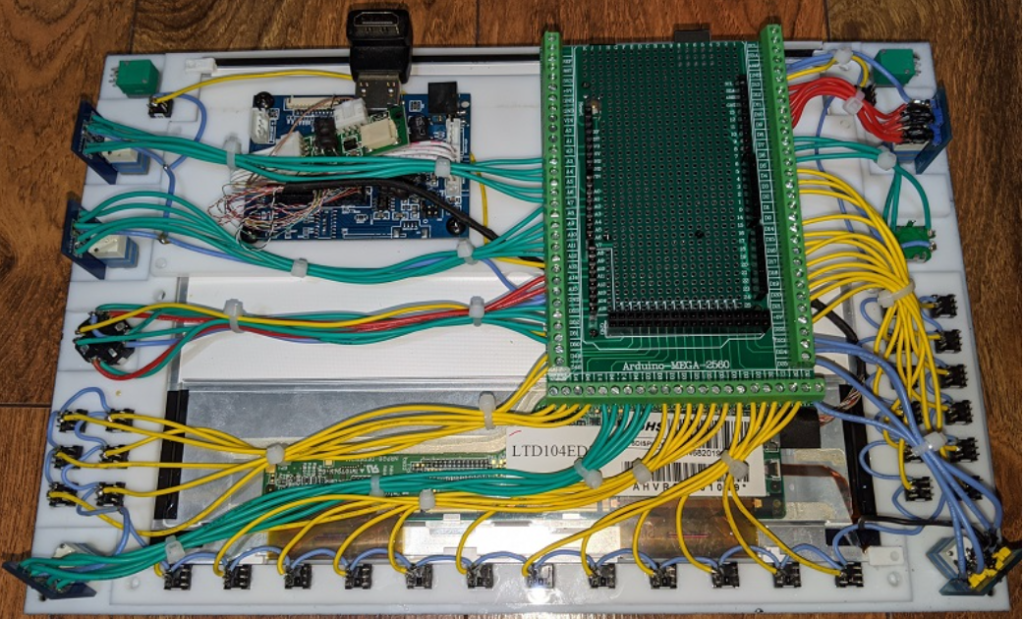
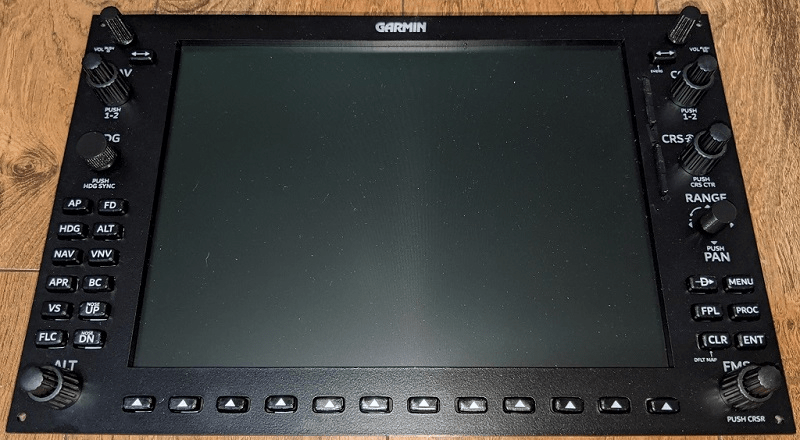
And a demo of the almost complete sim, with PilotEdge ATC on a VFR and pop-up IFR flight:
 CFI Ron Student Portal